TikTok
How to Use Fancy Fonts on TikTok: Name, Bio, Captions and Comments
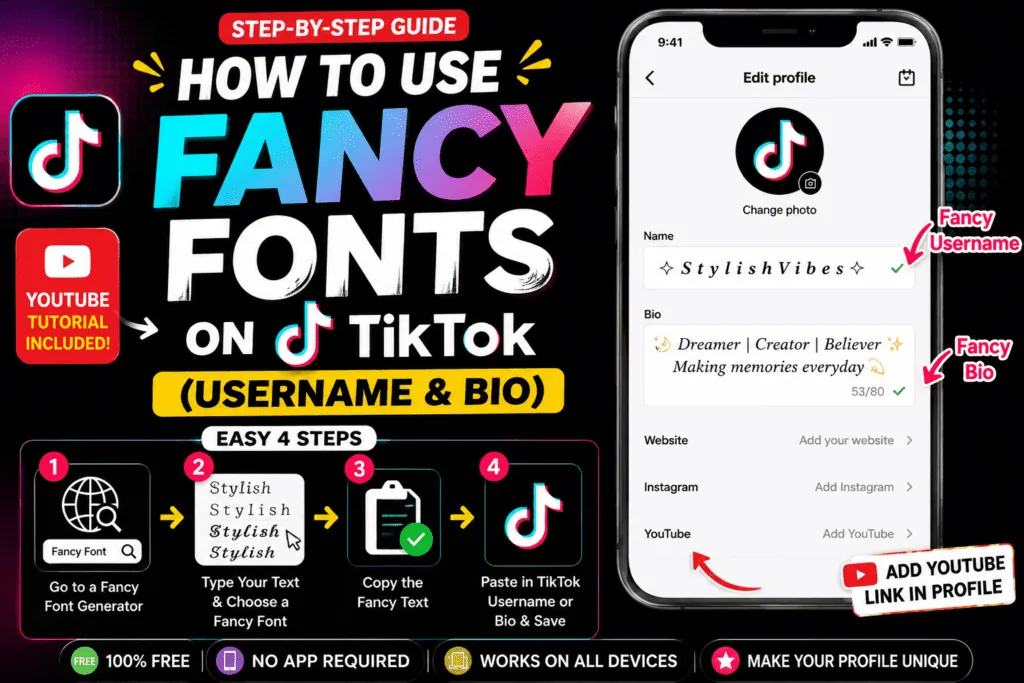
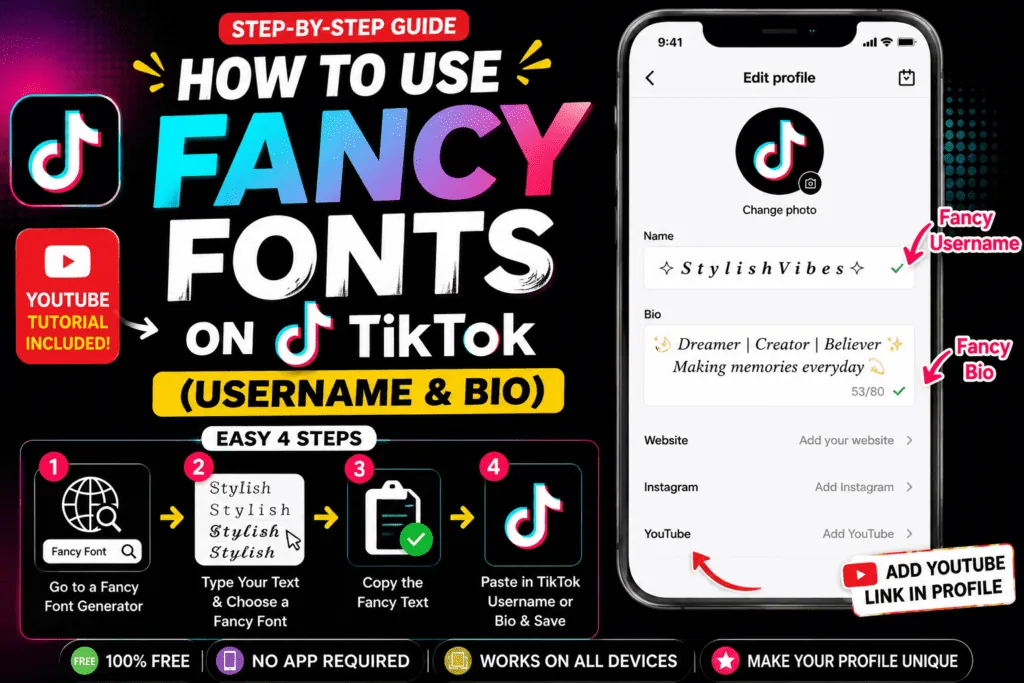
TikTok doesn't have a font picker for your profile, captions or comments. You can still use fancy fonts on TikTok by pasting Unicode styled text, the same trick creators use on Instagram. This guide shows exactly where styled text works, the one place it never does, and how to pick a style that fits your niche.
Where fancy fonts work on TikTok
| Place | Fancy fonts? | Tip |
|---|---|---|
| Name (display name) | Yes | The best place for a styled name. |
| Bio | Yes | The bio limit is short (80 characters), and many styles count double. |
| Video captions | Yes | Style a 3–6 word hook, keep keywords plain. |
| Comments | Yes | Bold works well for short replies. |
| Username (@handle) | No | Letters, numbers, underscores and periods only. |
How to add a fancy font to your TikTok profile
- Open the font generator and type your name or bio line.
- Tap Copy next to the style you like. Tap the ⓘ button first to see how many characters it really uses.
- In TikTok, go to Profile → Edit profile and tap Name or Bio.
- Paste, check how it looks, and save.
TikTok font styles by niche
- Beauty and lifestyle: bold script 𝓢𝓪𝓻𝓪 or soft symbols ✧ name ✧.
- Gaming: double-struck 𝕊𝕒𝕣𝕒, squared 🅂🄰🅁🄰, or ⚔ name ⚔.
- Horror and storytime: gothic 𝔖𝔞𝔯𝔞 or light Zalgo from the creepy text generator.
- Education and business: bold sans 𝗦𝗮𝗿𝗮 for the name, plain bio. Clear beats decorative.
Make captions and comments stand out
Only the first line of a caption shows before people tap "more", so style a short hook: 𝗪𝗮𝗶𝘁 𝗳𝗼𝗿 𝗶𝘁… and keep the rest plain. In comments, bold or italic works for emphasis. Avoid heavy Zalgo in comments: it spills over neighbouring lines and can be trimmed.
Create a signature style
Pick one style and one symbol and use them everywhere: your name, your caption hooks and your pinned comment. Consistency is what makes a style recognisable. Save your favourites with the ⭐ button in the generator so you can find them again quickly.
Fancy font ideas for TikTok comments and replies
- Pinned comment: 𝗣𝗮𝗿𝘁 𝟮 𝗶𝘀 𝘂𝗽 👆 (bold sans reads well at comment size).
- Reply to fans: ✧ 𝓉𝒽𝒶𝓃𝓀 𝓎ℴ𝓊 ✧ for a softer tone.
- Storytime series: 𝔓𝔞𝔯𝔱 3 in gothic for horror or mystery content.
- Giveaways: keep the rules plain and style only the headline, like 𝗚𝗜𝗩𝗘𝗔𝗪𝗔𝗬.
When a fancy font won't paste or save on TikTok
- "Invalid characters" in the name: remove heavy Zalgo marks and rare symbols, then try again. Small caps and bold letters are accepted more often.
- Bio cut short: double-width letters filled the 80-character limit. Switch one line to small caps or plain text.
- Boxes instead of letters: the viewer's phone lacks a font for that symbol. Use common symbols for anything important.
- Text pasted plain: some keyboards and clipboard apps strip formatting. Copy again directly from the generator and paste with a long-press → Paste.
Things to watch out for
- Bio length: with an 80-character limit, a double-width style can halve your space. Use small caps (one character per letter) for longer lines.
- Search: people find you by plain words. Keep your real name or niche keyword plain somewhere.
- Old phones: rare symbols may appear as boxes, so prefer common ones like ★ ♡ ✧.
Frequently asked questions
Can I use fancy fonts in my TikTok username?
No. TikTok usernames only allow letters, numbers, underscores and periods. Use the styled version in your Name field instead, which is shown in bold on your profile.
Do fancy fonts work in the text you add on a TikTok video?
The on-video text tool uses TikTok's own fonts. Pasted Unicode styles may display, but results vary, so test before you post. Captions and comments are the reliable places.
Will styled captions hurt my reach?
There's no public evidence of that, but TikTok search matches plain words. Keep keywords and hashtags in plain text and style only a short hook.